Writing code in C#
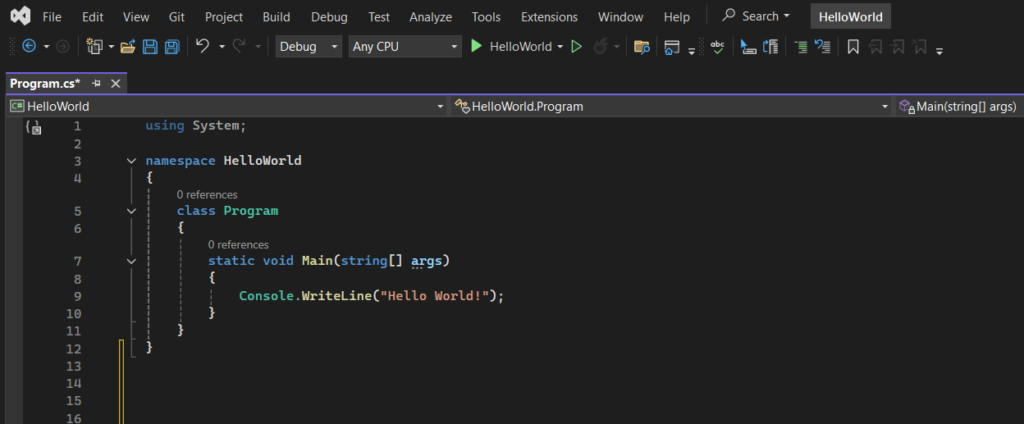
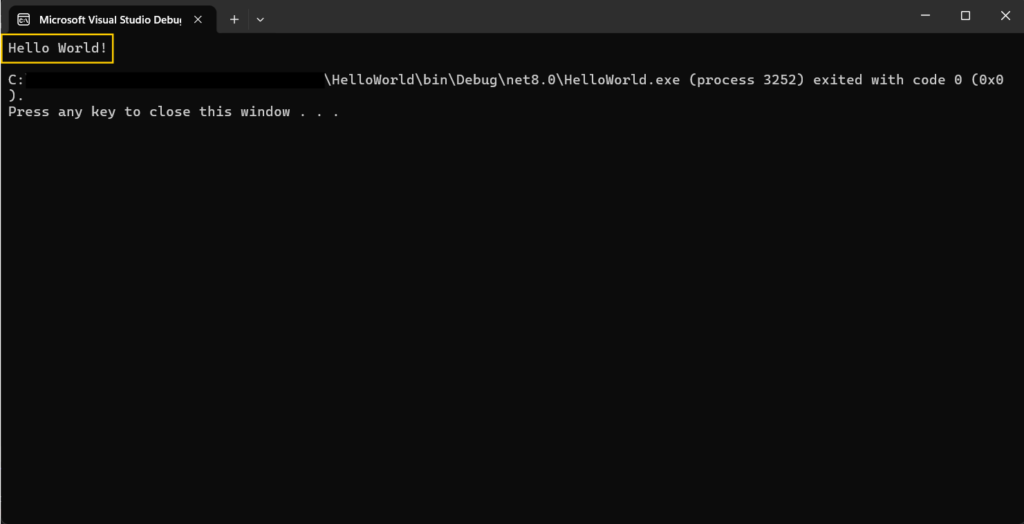
We use the following code to output the text “Hello World!” in the console.
Explanation of the example
Line 1: using System means that we can use classes from the System namespace.
Line 2: Blank line. C# ignores blank space but it help keep the code organized and easier to work with.
Line 3: namespace is used to organize the code. It is a container for classes and other namespaces.
Line 4: Curly brackets {} mark the beginning and the end of a block of code.
Line 5: class is a container for data and methods, which bring functionality to the code. Every line of code in C# has to be inside a class.
Line 7: Every C# program has a Main method. All the code within its curly brackets will be executed.
Line 9: Console is a class of the System namespace, which has a WriteLine() method. This method is used to print/output text. In this example, the output will be “Hello World!”.
Note 1: The end of every statement in C# needs to be marked with a semicolon ; .
Note 2: C# is case-sensitive, meaning that it matters whether uppercase or lowercase letters are used> “MyProgram” and “myprogram” would have different meanings.
Result
Exercise
Try the program from the example. Try changing the text which the program outputs.